Product Information
• Product Name: AYNE68 Low-Profile Magnetic Switch Gaming Gift Box
Price: 9000 NTD
• Dimensions: L312mm × W103mm × H27mm (including feet), bare machine approx. 700g
• Connectivity: TYPE-C wired connection
• Switch Parameters: Specially tuned low-profile magnetic switches, travel approx. 2.85mm, initial pressure 25GF, bottom-out pressure 45GF
• Performance Parameters: 8KHz polling rate, 48KHz full-key refresh rate, 100KHz single-key refresh rate, average latency 0.125ms, RT accuracy 0.01mm
• Casing Material: Full aluminum CNC process, electrostatic powder coating, with fine powder + glitter texture
Core Highlights
✨ Combines Aesthetics and Performance
• Pink and white gradient color scheme, with cute designs like cat paws and hearts, fulfilling a maiden's heart
• Full aluminum CNC casing, slim and exquisite, full of texture
✨ Details Designed for Girls
• 3D heart-shaped nail extensions to prevent accidental touches from long nails
• Handmade resin cat paw artisan keycaps, with replaceable ribbons (lace/braided/woven options)
• Stepped-height low-profile keycaps, PBT five-sided dye-sublimation, fine matte surface for more comfortable typing
✨ Gaming-Grade Performance
• Short-travel low-profile magnetic switches, light press, quick rebound, comfortable for long-term use
• Self-developed web driver Z-CENTER, supports RT parameter settings, SOCD function, and custom skins
• Optimized TRAY MOUNT structure with multi-layer sound dampening pads for purer typing sound
✨ Complete Gift Box Configuration
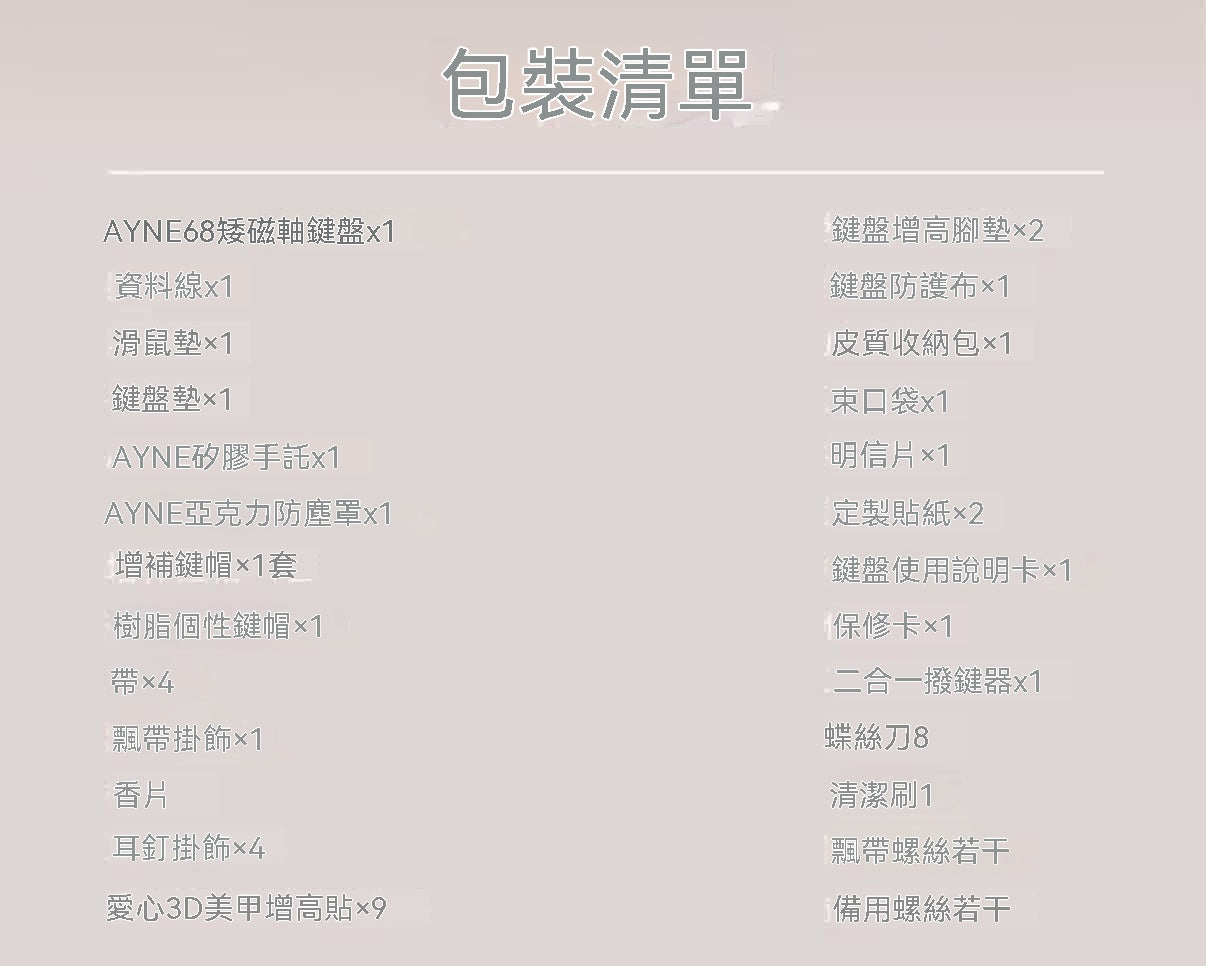
• Includes liquid silicone wrist rest, high-transparency acrylic dust cover, and exclusive storage bag
• Full toolkit (keycap puller, screwdriver, cleaning brush), convenient for changing keycaps and maintenance
How to Use
1. Connect Device: Connect the keyboard to your computer/laptop via a TYPE-C cable
2. Driver Settings: Open the Z-CENTER web driver to customize keys, lighting, RT parameters, etc.
3. Personalization: Use the toolkit to replace cat paw keycaps, ribbons, and attach heart-shaped extensions
4. Daily Maintenance: Use the dust cover to prevent dust, cleaning brush to clear key crevices, and the storage bag for portability
User Reviews
"So pink and cute! My long nails finally don't accidentally press keys, typing feels light, and gaming is smooth too~"
—— Little Tao, Nail Art Lover
"The full aluminum casing has amazing texture, and the ribbons and cat paw keycaps are so adorable, perfect as a gift for my bestie!"
—— A-You, Gaming Girl
"The driver settings are very convenient, and the latency is super low. It keeps up well when playing LoL and FPS, balancing looks and performance~"
—— Little Xing, Gamer
Precautions
• Avoid prolonged exposure to direct sunlight to prevent discoloration of the casing
• When cleaning, use a dry or slightly damp cloth; do not use chemical cleaning agents
• Handle keycaps/ribbons gently when replacing them to avoid damaging the clips
• Store in the exclusive storage bag to prevent scratches on the casing
• If connection issues occur, first check if the TYPE-C cable is securely plugged in, or reinstall the driver