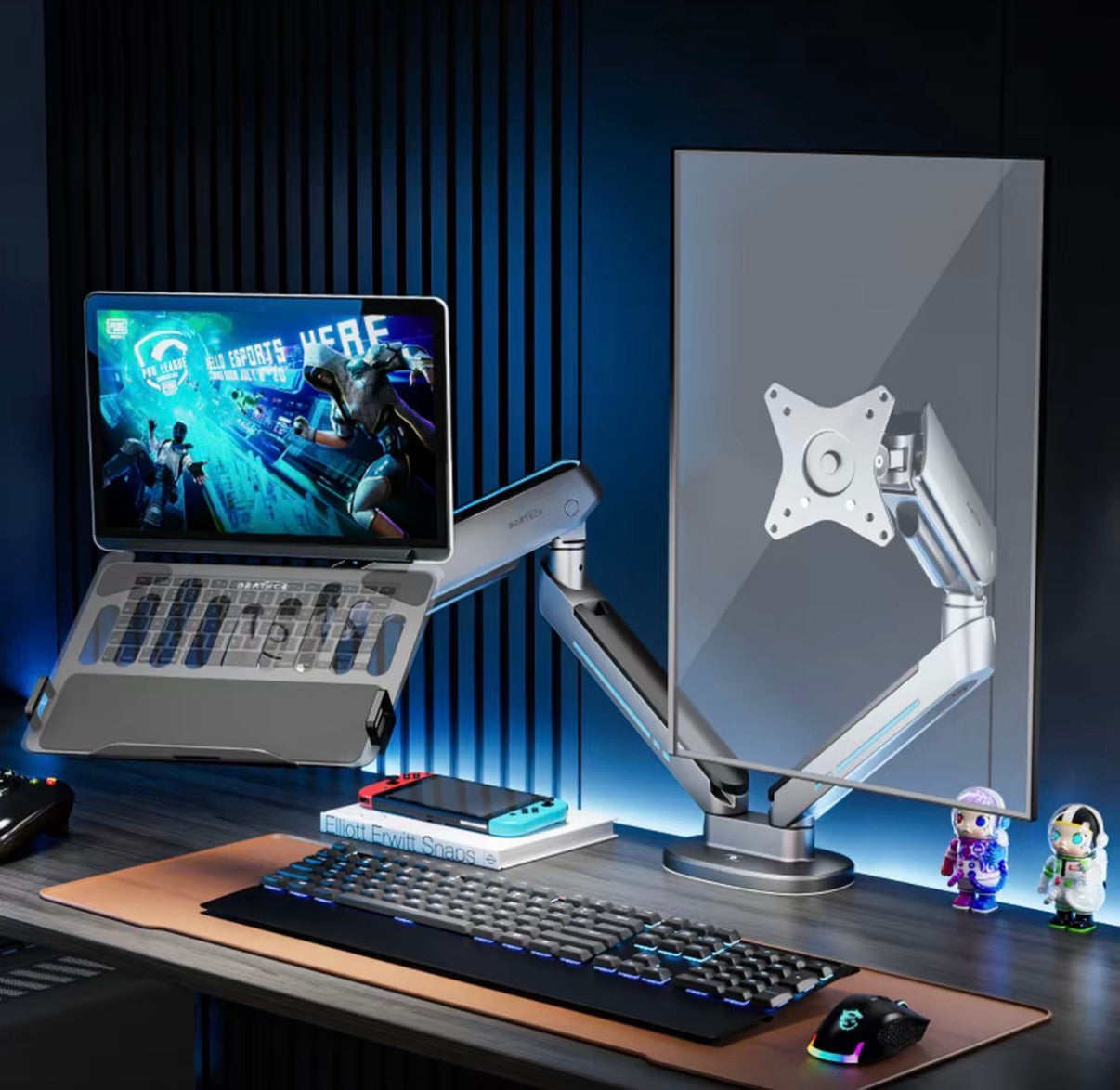
Product Information
Single Monitor Standard Model (E700)
• Load Capacity: 2–9KG, suitable for 17–34 inch flat/curved screens
• Colors: Nardo Grey, Cloud White
• Installation: C-clamp/Grommet dual-mode, compatible with 75×75mm, 100×100mm standard VESA mounting holes
• Material: Aluminum alloy + iron plate + high-strength plastic, passed German TÜV Rheinland safety certification, holds appearance and utility model patents
Single Monitor Enhanced Model (E700 MAX)
• Upgraded Load Capacity: 5–14KG, exclusively for 27–45 inch ultra-wide curved screens
• Reinforced Structure: Thickened aluminum arm, large screens won't wobble or sag
Dual Monitor Model (E700‑2)
• Supports two monitors simultaneously, left and right can be adjusted independently
• Single monitor load capacity 2–9KG, suitable for 17–34 inch screens
• Dual arm synchronized RGB lighting effects, creating an immersive dual-monitor gaming setup
Core Highlights
1. Cyber RGB Dazzling Lighting Effects
Built-in 20 switchable RGB lighting effects, including flowing light, breathing, meteor, constant light, etc., one-button control switch, light strip runs through the main arm and base of the stand, instantly enhancing the gaming atmosphere, perfectly matching PC case and keyboard/mouse lighting.
2. Five-Axis Universal Flexible Adjustment
Five-axis linkage structure, the screen can rotate 360°, extend 477mm forward/backward, lift 195–460mm up/down, adjustable tilt angle, freely switch between portrait, top-down, and upward-facing modes, giving you full control over your office, gaming, and streaming perspectives.
3. Bionic Mechanical Spring, Stable and Durable
Utilizes high-quality mechanical spring drive,经过50000+次疲勞測試經過50,000+ fatigue tests, smooth lifting without jamming; dedicated anti-sagging device, securely locks after adjustment, preventing screen drop even after long-term use.
4. User-Friendly Detail Design
• Slot-in Panel: Simply insert and clip for quick and effortless installation
• Hidden Cable Management: Cables are stored within the stand, keeping your desktop clean and tidy
• Frosted Aluminum Alloy Casing: Delicate texture, scratch-resistant and wear-resistant, the cyber-mech appearance complements various gaming desks
5. Full Compatibility with Large Screens
Covers everything from entry-level small screens and mainstream gaming screens to 45-inch ultra-wide curved screens, with a dedicated support design for curved screens that prevents edge pressure and screen squeezing.
How to Use
1. Choose installation method: C-clamp directly fixes to the table edge, grommet passes through the table hole and tightens the base
2. Slot-in quick screen installation: Align with the buckle on the back panel of the stand, and clip to secure the screen
3. Adjust spring damping: According to the screen weight, adjust the internal damping screw of the stand to ensure smooth lifting without sagging
4. Lighting effect control: Click the button on the base to switch between 20 RGB lighting effect modes, long press to turn off the lights
5. Angle adjustment: Directly push and pull the stand to adjust the screen height, angle, and front-back distance to a comfortable position
Real User Reviews
• "The RGB lighting effects are super cool and perfectly match my gaming desk, instantly making my setup look premium. My 40-inch curved monitor is supported super steadily, no wobbling at all."
• "The lifting is super smooth, and the five-axis adjustment is incredibly convenient. It's perfect for switching perspectives between work and gaming, and the cable management design is so practical, my desk is finally organized."
• "Installation was super easy, the slot-in design took only a few minutes. The spring structure is durable, it hasn't sagged at all after a long time of use, excellent value for money."
Precautions
1. Confirm desk thickness before installation: C-clamp is suitable for 10–85mm, grommet for 10–80mm
2. Strictly match screens within the load capacity range; exceeding it may damage the stand or cause the screen to fall
3. For curved screens, prioritize the MAX model, as it has greater load capacity and a more conforming support surface for curved screens
4. Adjust spring damping gently to avoid damaging the internal structure by applying too much force
5. Long-term use of lighting effects will not generate heat and will not affect the lifespan of the screen or stand
Video link 🔗 (copy to open) https://www.instagram.com/reel/DYhbVRSxUHr/?igsh=MXZqenJ3dTg0Z2pwaw==