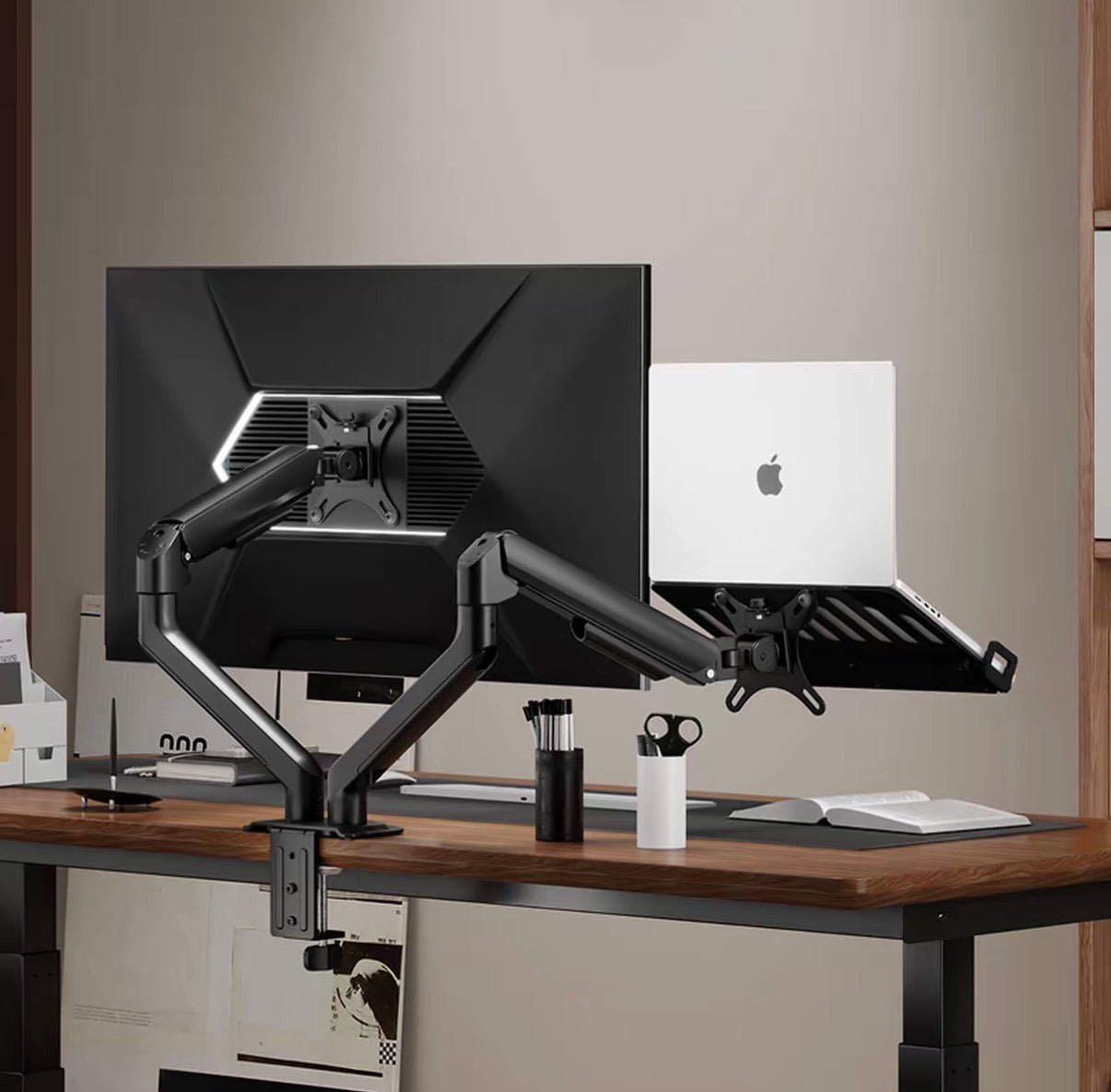
1. Product Information
• Compatibility: Compatible with laptops 11.6-18 inches (body length 290-458mm), maximum load 9KG; monitors 17-32 inches, load 1-9KG, supports curved, ultrawide, and other screen types, VESA mounting holes 75x75mm/100x100mm
• Installation Methods: Clamp-on and grommet mounting dual modes, compatible with desktop thickness 10-60mm; grommet installation requires a desktop hole diameter ≥60mm
• Materials and Appearance: Main body made of aluminum, iron (sheet metal), and plastic, color scheme meteorite gray + crystal black; stand net weight 2.00KG (excluding accessories), tray net weight 1.02KG (excluding accessories)
• Adjustment Parameters: The stand supports multi-dimensional rotation: base ±90°/±180° rotation, arm ±180° rotation, screen connection ±90° rotation, screen tilt angle ±55°
2. Key Features
• Ergonomic Floating Design: The tray + stand combination allows the laptop to float in three dimensions, freely adjusting screen height and angle, eliminating the need to look down or hunch over. Maintain a comfortable sitting posture even during long periods of sitting, alleviating neck and shoulder discomfort.
• Multi-dimensional Free Adjustment: Driven by a mechanical spring core, it allows for easy adjustment and arbitrary hovering. It can also adjust the support force according to the weight of the device, enabling smooth switching between laptops, monitors, and tablets.
• Enhanced Heat Dissipation and Protection: The tray features a scale-like ventilation hole design, precisely aligning with the laptop's heat dissipation areas to enhance cooling. Paired with a large-area silicone anti-slip mat, it provides stable anti-slip protection and prevents scratching devices, is easy to clean, and resists curling.
• Stable and Unobstructed Ports: Built-in high-density springs on both sides allow for stepless adjustment of clamping width, ensuring devices do not tilt. The clamping mechanism is optimized by moving it downwards, avoiding laptop ports, so connecting cables is completely unimpeded.
• Flexible for Multiple Scenarios: Not only can it support a laptop individually, but it can also be used in combination with a monitor, significantly increasing desktop space utilization, suitable for home office, gaming, and entertainment.
3. How to Use
1. Installation and Fixing: Choose the installation method according to your desk. For clamp-on, ensure a tight fit against the edge of the desk without gaps. For grommet installation, ensure the desk hole diameter is ≥60mm. Secure the stand base to the desktop, then tighten the screws.
2. Device Installation: Place the laptop on the tray, adjust the clamping mechanisms on both sides to securely hold the laptop, ensuring the device does not wobble. If using with a monitor, attach the monitor to the VESA mounting position on the stand.
3. Angle Adjustment: Grasp the stand arm or tray, and freely adjust the height, rotation direction, and tilt angle. Release once you've found a comfortable viewing angle, and the stand will automatically hover and lock into place.
4. Force Adjustment: If the device is too light or too heavy, use the included tool to adjust the stand's force knob. For heavier devices, increase the support force; for lighter devices, decrease it, to ensure smooth adjustment.
5. Daily Use: Once adjusted, you can use your device normally. You can readjust the angle at any time according to your needs without affecting daily operations.
4. Real User Reviews
• Office Worker Netizen: "I used to look down at my laptop all day, and my neck and shoulders would ache after work. After switching to this stand, the screen is perfectly level with my line of sight, and I'm comfortable even after sitting for a long time. It also freed up so much desk space for my keyboard, super practical!"
• Gamer Netizen: "The ventilation holes on the tray are really useful; my laptop doesn't get super hot when I'm gaming. The stand adjusts smoothly too; I can fix it at any angle I want, and the clamping is very stable. I don't have to worry about my laptop falling at all."
• Multi-device User Netizen: "I use both a laptop and a monitor with this. Both stands are very flexible to adjust, making switching between them super convenient. The material also feels high quality, and it was easy to install; I got it done in half an hour."
• Student Netizen: "My dorm desk is small, so using this floating stand to suspend my laptop frees up space for books and my keyboard. The silicone pads won't scratch my laptop, and adjusting the angle is very smooth. Highly recommended!"
5. Precautions
• Before installation, ensure that your desktop thickness and hole size meet the installation requirements. If the desktop thickness exceeds 60mm or the hole diameter is less than 60mm, it is recommended to switch to a corresponding model or consult customer service.
• When placing the device, ensure the clamps securely hold the laptop/monitor to prevent the device's center of gravity from shifting and causing it to slip. Do not use with devices exceeding the load capacity.
• Adjust the stand gently; avoid forcibly bending the arm. When not in use for extended periods, return the stand to its original position to reduce continuous stress on the spring structure.
• When cleaning, wipe the surface with a soft cloth; avoid using corrosive cleaning agents. If the silicone pads are dirty, they can be removed and washed separately, then reinstalled after drying.
• If the stand shakes or is unstable after installation, check if the base screws are tightened, or readjust the force knob to ensure the support force matches the device's weight.
• For monitors without VESA mounting holes that are not equipped with a VESA bracket, do not attempt to hang them directly on the stand. Specialized accessories must be selected and installed first.
Video link 🔗 (copy to open) https://www.instagram.com/reel/DbamRJUROV9/?igsh=djFpOHo3MTE3aW1m