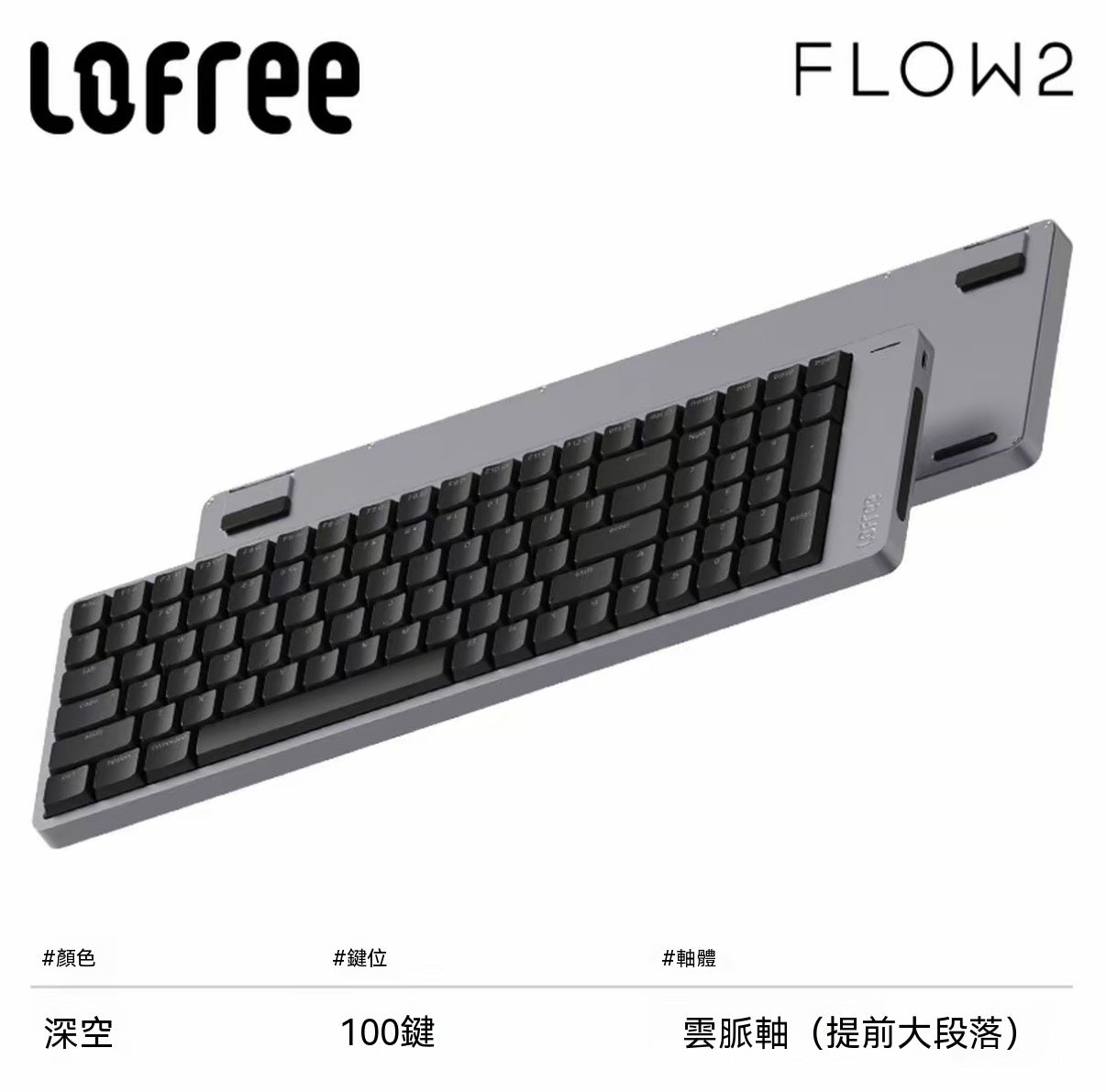
Product Information
The Xiaoshun FLOW2 Tri-Mode Low-Profile Mechanical Keyboard is a premium input device designed for users who seek minimalist aesthetics and efficient productivity. The entire body is crafted from a single piece of CNC aluminum alloy, complemented by a fine 205-mesh sandblasting process that delivers a warm, smooth tactile feel and a high-end texture. It features Kailh co-developed Cloud series low-profile switches, combined with a GASKET buffered structure, for a smooth, soft, and bouncy typing experience. Supporting wired/Bluetooth 5.3/2.4G tri-mode connectivity, it's compatible with Windows, Mac, iOS, and Android systems. With practical functions like a side touch bar, hidden kickstands, and VIA custom key mapping, it provides an ultimate user experience whether for office work, creative tasks, or light gaming. Available in 68/84/100 layouts, black and white color options, and Cloud Drive (linear), Cloud Pulse (tactile), and Cloud Quiet (silent linear) switch types, it caters to different usage scenarios and tactile preferences.
Core Highlights
✅ All-aluminum integrated CNC craftsmanship, ultimate minimalist aesthetics
The body is crafted from a single piece of aluminum alloy through 6 precise processes, with 0.01mm precision engraving, and finished with 205-mesh sandblasting and anodizing. The texture is delicate and fingerprint-resistant, and its minimalist design perfectly integrates with various desktop styles, making it a desktop art piece.
✅ Custom Cloud series low-profile switches, a comprehensive upgrade in feel
Co-developed with Kailh, the Cloud series switches feature 12 stem guide stabilization points for extremely low friction and precise positioning. The low actuation force of 40±10gf ensures comfortable typing even during prolonged use:
• Cloud Drive Linear Switch: Creamy smooth, straight up and down without resistance, ideal for long typing sessions.
• Cloud Pulse Early Tactile Switch: A distinct "click" bump in the middle, offering strong feedback and satisfying press, suitable for users who prefer tactile switches.
• Cloud Quiet Linear Silent Switch: Equipped with silencing pads on the stem, offering a rubbery dampening feel, quiet and non-disturbing, suitable for office use.
✅ GASKET full-layer cushioning, superb smooth and bouncy feel with excellent acoustics
Multi-layer material filling structure, combined with silicone dampening pads, IXPE switch pads, etc., effectively absorbs typing vibrations, providing a soft, bouncy, and resilient typing feel. It also significantly reduces typing noise, improving both feel and acoustics.
✅ Side touch bar, ultra-convenient adjustment with a single swipe
The keyboard features a built-in touch bar on the side. Swipe up to increase volume, swipe down to decrease volume. Hold the Fn key and swipe to adjust screen brightness. No need to switch windows; one swipe does it all, maximizing efficiency. You can also lock the touch bar by pressing Fn+Space for 3 seconds to prevent accidental touches.
✅ Upgraded ergonomic keycaps, reduced mistypes, smoother feel
Utilizes PBT+PC double-shot injection molding. The high-content PBT material is resistant to shine, and characters will never wear off. Optimized chamfer curvature (reduced from 0.45mm to 0.23mm), and keycap area expanded from 193.4mm² to 217.2mm², perfectly fitting fingertips, significantly reducing mistypes, and making typing smoother.
✅ Tri-mode connectivity + 1000Hz polling rate, zero-latency experience
Supports wired/Bluetooth 5.3/2.4G tri-mode connectivity. Achieves an ultra-high 1000Hz polling rate in wired and 2.4G modes, providing zero-latency fast response for smooth office work and responsive gaming. Bluetooth can connect to 3 devices simultaneously, allowing one-key switching for convenient cross-device work.
✅ Hidden kickstands, two-level angle adjustment
The kickstands are integrated into the body design, making them aesthetic and unobtrusive: 84/100 layouts support 0°/5° angles, while the 68 layout supports 0°/7° angles. You can adjust to the most comfortable typing angle according to your habits, preventing fatigue during long-term use.
✅ VIA custom key mapping, creating your exclusive productivity tool
Fully supports VIA key mapping, allowing you to freely define the function and macros of each key. Whether it's office shortcuts or gaming hotkeys, they can be activated with a single press, fully unleashing efficiency.
✅ Long battery life + hot-swappable, flexible upgradeability
The 68 layout features a 2000mAh battery, providing up to 90 hours of battery life with backlighting off. The 84/100 layouts feature a 3000mAh battery, offering up to 120 hours of battery life with backlighting off, eliminating the hassle of frequent charging. Supports hot-swappable design, allowing you to freely change your preferred switches to create a personalized feel.
How to Use
Connectivity
1. Wired Connection: Toggle the mode switch to wired, and connect the device with a Type-C cable.
2. Bluetooth Connection: Toggle the mode switch to Bluetooth, long-press Fn+Q/W/E until the indicator light flashes. Search for the corresponding Bluetooth name on your device and connect. Short-press Fn+Q/W/E to switch between connected devices.
3. 2.4G Connection: Toggle the mode switch to Bluetooth, insert the 2.4G receiver, short-press Fn+R to enter 2.4G mode. Once connected, the indicator light will stay on for 3 seconds then turn off.
Quick Operations
• Touch Bar Operation: Swipe up = increase volume, swipe down = decrease volume; Hold Fn + swipe = adjust screen brightness; Fn + Space for 3 seconds = lock/unlock touch bar.
• System Switching: Fn+N = switch Windows/Android system, Fn+M = switch Mac/iOS system.
• Backlight Control: Short-press Fn+←/→ = switch between steady on/breathing/off backlight.
• 68 Layout F-key Switching: Fn+Tab = switch between top row number keys/F function keys.
• VIA Custom Key Mapping: Visit the VIA official website and import the corresponding JSON file to customize keys.
Maintenance Tips
• Avoid liquid spills, regularly clean dust from key gaps with a cleaning brush.
• PBT keycaps can be periodically removed and cleaned, avoid using corrosive cleaning agents.
• When not in use for an extended period, turn off the power to prolong battery life.
User Reviews
✨ "The texture of the aluminum unibody is incredible, feels substantial in hand. The typing feel is soft and bouncy, and the side slider for volume is super convenient. My office efficiency has gone through the roof!"
✨ "The Cloud Quiet switches are really silent, perfect for office use without disturbing colleagues. The PBT keycaps haven't shined at all after half a month, I love it!"
✨ "Tri-mode switching is incredibly smooth. I can connect it to my office computer, home tablet, and phone. I've set up all my common shortcuts with VIA key mapping, making work super easy."
✨ "The low-profile design is perfect for long typing sessions, my wrists don't get tired at all. The hidden kickstands are also convenient for adjusting angles. Both aesthetics and practicality are top-notch!"
Precautions
⚠️ This product supports hot-swapping. When changing switches, ensure the keyboard is powered off to avoid damaging the PCB.
⚠️ The 1000Hz polling rate is only supported in wired and 2.4G modes, not applicable to Bluetooth mode.
⚠️ After the side touch bar is locked, you need to press Fn+Space for 3 seconds again to unlock it for use.
⚠️ For the JSON file required for VIA key mapping, please contact customer service.
⚠️ Please use the original Type-C cable for charging to avoid damaging the device with inferior charging cables.
⚠️ This product is an electronic device, please avoid dropping, squeezing, and high-temperature environments.