ollig好物分享
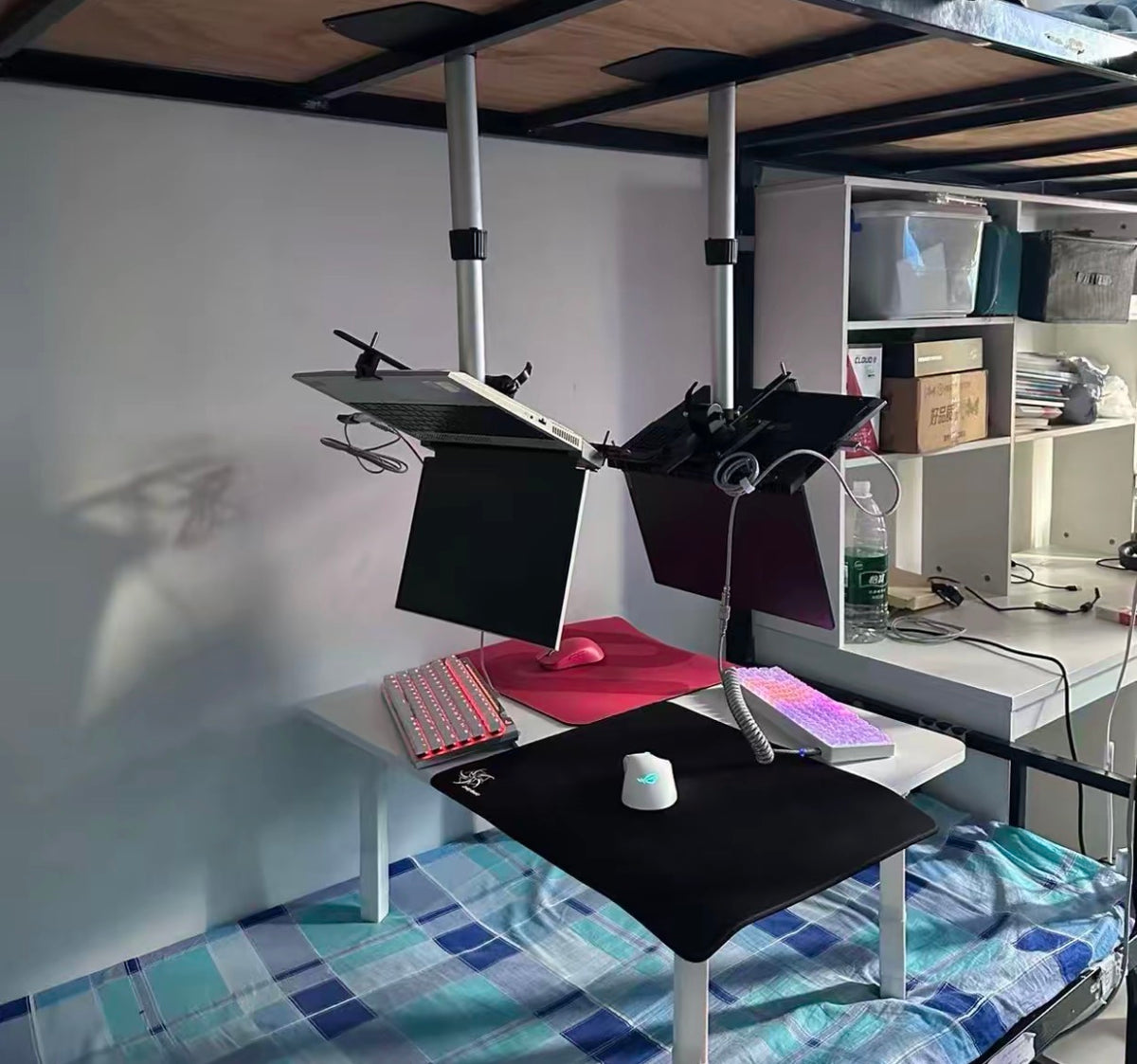
Versatile Laptop Underside/Side Mount Folding Stand Gaming Stand
Versatile Laptop Underside/Side Mount Folding Stand Gaming Stand
Couldn't load pickup availability
1. Product Information
This is a multi-functional laptop stand available in four styles: standard desktop, standard dual-use, foldable desktop, and foldable dual-use. The main body is made of high-proportion metal, with a thickened 3mm base, an adjustable lifting column, and multi-directional adjustable joints. It supports various placement modes such as inverted and side-mounted, compatible with various laptop sizes. It is suitable for scenarios like competitive gaming, working from home, and long periods of binge-watching. The kit includes the main stand, fixing accessories, an installation wrench, and other complete components.
2. Core Highlights
• ✨ Innovative inverted design, mimicking monitor viewing effects, reducing head-down posture, and alleviating cervical spine strain.
• 🛠 Multi-mode switching, supporting inverted and side-mounted placement. The dual-use style can clamp to a desk edge, suitable for both desktop and desk-clamped scenarios.
• 📐 Freely adjustable height and angle, with adjustable tilt, allowing for comfortable viewing angles based on individual sitting postures.
• 🧱 Thickened metal base, solid structure, anti-slip and anti-shake, stable load-bearing capacity, not prone to shaking during competitive gaming.
• 📦 Foldable structure design, can be folded for storage, saving space when moving or storing.
• 🔥 Inverted placement helps air circulate at the bottom of the laptop, enhancing heat dissipation and lowering operating temperatures under high load.
3. How to Use
1. According to the chosen style, assemble the main stand using the included accessories and tighten the screws with the provided wrench, ensuring the overall structure is secure.
2. For desktop models, place directly on a flat surface; for dual-use models, attach the desk clamp accessory to the edge of the desk for securing.
3. Insert the laptop into the two fixing brackets and adjust the buckle length to firmly secure the laptop body.
4. Loosen the adjustment knob, adjust the column height and screen tilt angle, switch between inverted or side-mounted modes, then tighten the knob after adjustment.
5. Gently shake to test before use, ensuring the laptop is stable before normal operation.
4. Real User Reviews
• "Super useful for gaming! My neck doesn't have to be bent down, heat dissipation is better, and the viewing angle is very comfortable after inverting."
• "The metal material is very solid; it doesn't shake easily. The dual-use model can clamp to a desk, which is great for small spaces."
• "Easy to assemble, all accessories are included, and the angle adjustment is very flexible. Suitable for both work and gaming."
• "The foldable model is very convenient for storage. It doesn't take up much space even when I need to move it occasionally. Great value for money."
• "My laptop used to get very hot when gaming, but with the inverted placement, the bottom gets ventilation, and the temperature has significantly dropped."
5. Precautions
⚠️ Only suitable for laptops. Please ensure laptop size and weight are within the stand's load-bearing capacity. Do not overload.
⚠️ When installing, ensure all screws and knobs are securely tightened. Always test stability before use to prevent the device from falling and being damaged.
⚠️ For desk-clamped dual-use models, the desk thickness must be within the clamp's gripping range to prevent tipping due to insecure clamping.
⚠️ When adjusting height and angle, hold the laptop body firmly before loosening the knob to prevent the laptop from sliding and falling.
⚠️ Keep away from humid environments, avoid impacting metal parts; regularly check if screws are loose and tighten them promptly.
⚠️ It is not recommended to place on inclined or uneven surfaces. Ensure the base contact surface is flat.
Video Link 🔗 (Copy to open) https://www.instagram.com/reel/DcQb5KAyO5K/?igsi=cWV5OXd0ZDdiankw
分享