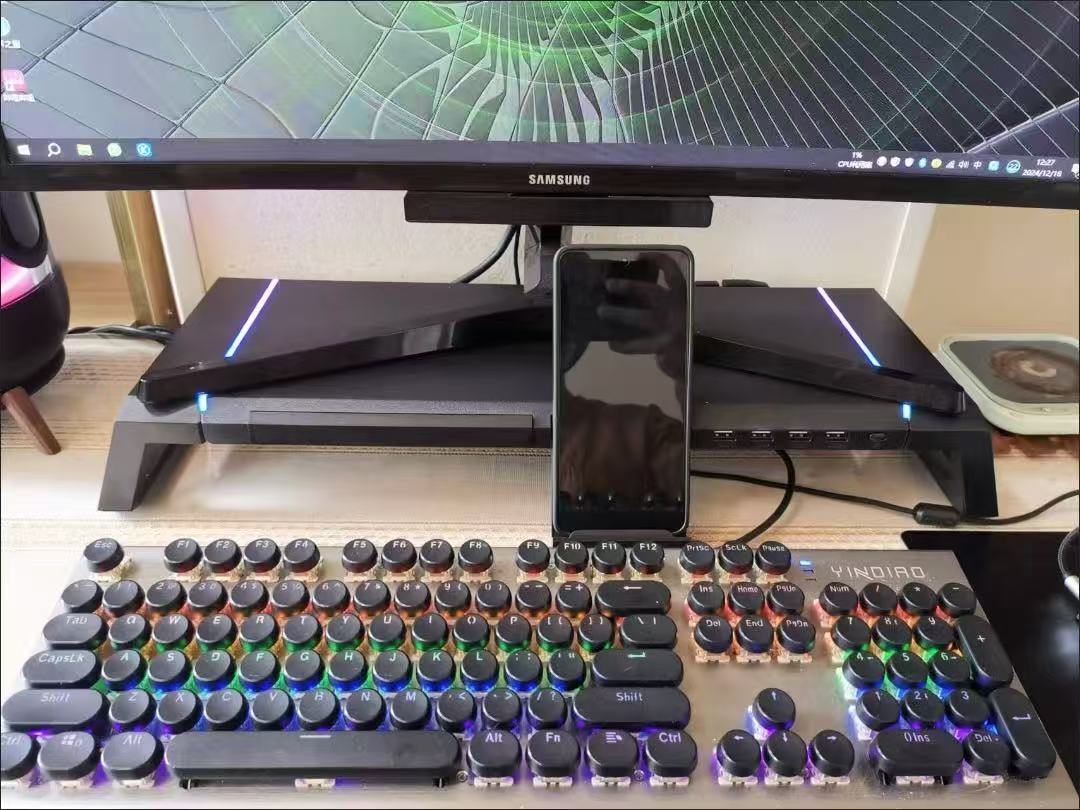
Product Information
This is a foldable, multi-functional monitor stand that primarily elevates and stores desktop monitors, organizes desktops, and offers expansion, transmission, and lighting decoration functions. It is suitable for various usage scenarios such as office desks, gaming desktops, and small tables, and can accommodate all-in-one PCs and LCD monitors.
Key Features
1. Foldable and Retractable Panel
The stand body can be folded to adjust its length, making it suitable for small desktops and flexible for different monitor sizes. When not in use, it can be stored to save space.
2. USB3.0 High-Speed Expansion Interface
Equipped with multiple USB3.0 ports, it offers a theoretical transfer speed of up to 500m/s. It can connect to USB drives, external hard drives, mice, and charge mobile phones. It can also reliably read large-capacity hard drives, solving the problem of insufficient host ports.
3. Dazzling RGB Gaming Lighting Effects
Built-in ambient lights on both sides offer up to 10 lighting modes. A dedicated button allows switching on/off and between modes, creating a gaming desk style with full visual impact.
4. High-Load Reinforced Structure
With a built-in M-shaped reinforced steel plate, the structure is solid, and the overall load capacity can reach approximately 20KG. Heavy all-in-one PCs or large monitors can be placed on it without easily deforming or wobbling, ensuring high stability.
5. Desktop Storage Planning
Keyboards and mice can be stored under the elevated monitor. A side mobile phone holder keeps your phone off the desk, organizing clutter and freeing up workspace.
How to Use
1. Unfold the stand's panel and adjust its length according to the monitor's width, then place it on a flat desktop.
2. Place the monitor/all-in-one PC securely on top of the stand and store the keyboard and mouse in the space beneath the stand.
3. Connect the USB cable to your computer host to use the external ports for USB drives, hard drives, and device charging.
4. Click the light control button to switch the RGB light on/off and cycle through different lighting modes.
5. When not in use, the panel can be folded and retracted to reduce its size for storage.
User Reviews
• Office users: Elevating the monitor makes sitting more comfortable, reducing neck pain from looking down. The USB expansion perfectly solves the problem of insufficient ports on laptop hosts.
• Gamers: The RGB lighting creates a strong ambiance and complements gaming desks. The solid structure ensures large monitors don't wobble.
• Small desk users: The foldable design is very practical; it doesn't make small desks feel cramped. Storing the keyboard underneath makes the desk much tidier.
Precautions
1. When placing the monitor, try to center it on the stand to avoid uneven stress distribution on the structure from prolonged off-center loading.
2. The USB3.0 transfer speed is a theoretical value; actual speeds may be affected by external storage devices and the computer host's port version.
3. Leaving the lights on for extended periods will consume a small amount of power; turn off the ambient lights when not in use to save energy.
4. The maximum load capacity is 20KG; do not place overweight items to avoid deformation or damage to the stand.
5. Choose a flat desktop for placement; avoid inclined or slippery surfaces to prevent the monitor from tipping over.
Video link 🔗 (copy to open) https://www.instagram.com/reel/DZraf8iSk-X/?igsh=N3FrbGNiY3o0bDg1