ollig好物分享
Universal Laptop Under-Desk Mount
Universal Laptop Under-Desk Mount
Couldn't load pickup availability
1. Product Information
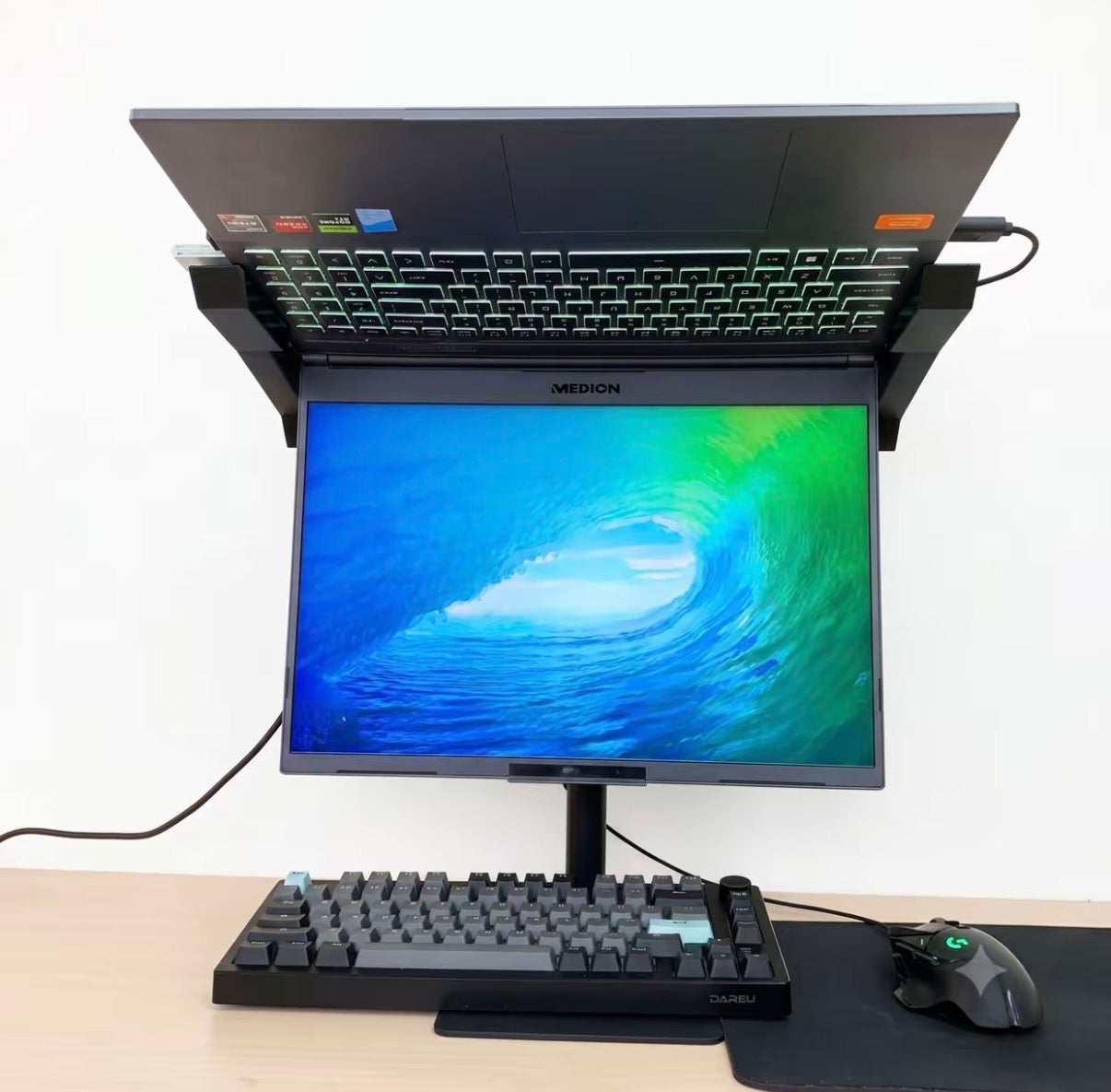
Suitable for 14-inch to 18-inch laptops, compatible with thin and light laptops and gaming laptops; the overall metal structure with a 3mm thickened cold-rolled steel plate base allows for inverted laptop placement, supporting height adjustment and multi-angle tilt adjustment; the hollow, open-clamp design does not block the laptop's side interfaces or heat dissipation vents, making it suitable for dorms and home offices to create a dual-screen working environment.
2. Core Highlights
✅ Inverted Dual-Screen Solution: Place the laptop on top as a secondary screen, with a primary screen below, significantly expanding the viewing space for office work, creation, and gaming.
✅ Full-Coverage Hollow Heat Dissipation: Unobstructed airflow from the bottom solves the problem of high-load heating in gaming laptops, preventing overheating and throttling.
✅ Uninterrupted Interfaces: The side clamps cleverly avoid the laptop's ports and vents, allowing for plug-and-play charging and external peripherals.
✅ Stable Thickened Steel Base: 3mm ultra-thin steel plate base with solid weighting and strong load-bearing capacity, preventing shaking or tipping when placing two laptops.
✅ Free Adjustment of Height and Tilt Angle: Adjust the viewing angle according to your sitting posture for comfortable neck support.
✅ Wide Compatibility: Universally compatible with most 14-18 inch laptops on the market.
✅ Cable Management Design, Easy Installation, Saves Desk Space.
3. How to Use
1. Unpack the accessories, then tighten and fix the pole to the steel plate base.
2. Install the upper laptop clamp, adjust the clamp distance on both sides according to your laptop's width, and then secure it.
3. Invert the laptop and insert it into the clamp, ensuring the device is firmly secured and does not slide.
4. Loosen the adjustment knob, raise or lower the pole, and adjust the screen tilt angle. Tighten the knob once you reach a comfortable viewing position.
5. Connect the video cable to set up the inverted laptop as an extended screen, completing your dual-screen setup.
4. Real User Reviews
▪ Gaming laptop cooling savior! The temperature was very high when playing games flat, but after inverting it, the airflow is smooth, and the temperature has significantly dropped.
▪ Perfect for a small dorm desk, no need to buy an extra monitor. My old laptop directly becomes a secondary screen, greatly improving work efficiency.
▪ The base is very solid; it doesn't wobble even when I forcefully tap the desk. The clamps won't scratch the laptop casing.
▪ Most stands block the side vents, but this one leaves space on both sides, allowing charging cables and headphone cables to be plugged in normally.
▪ The adjustment mechanism is smooth, and the angle locks securely. It won't slowly slide down during long periods of use.
5. Precautions
⚠️ Before placing the laptop, always ensure the left and right spacing of the clamp is tightened to prevent the device from slipping.
⚠️ When adjusting the height and angle, hold the laptop with both hands before loosening the adjustment knob.
⚠️ Only suitable for 14-18 inch laptops; for smaller models, pay attention to clamping stability.
⚠️ It is recommended to place the stand on a flat and sturdy desk; do not place it on soft pads or uneven surfaces.
⚠️ Regularly check if all screws are loose to maintain overall stability.
⚠️ Do not forcefully squeeze the laptop body when clamping to avoid creating indentations on the casing.
Video link 🔗 (copy to open) https://www.instagram.com/reel/DauwleyzvzL/?igsh=dzN3bTV4YzAzMXBr
分享