Product Information
• Product Name: Wokyis M5 Retro Macintosh HDD Enclosure Dock
• Compatibility: Exclusively for Mac mini M4/M4 Pro; also compatible with Windows and Linux devices with full-featured Type-C ports
• Product Dimensions: Approx. 145×131×154 mm
• Product Weight: Approx. 750g
• Design: Retro Macintosh-style beige matte body, perfectly blending "retro + modern" with the silver Mac mini body
• Version Differences: Available in 10Gbps and 80Gbps (Thunderbolt 5) versions, with core differences in transmission speed and interface specifications
Key Highlights
✅ Thirteen Full-Featured Expansion Ports, Single-Cable Solution for All Needs
• Front Ports: 2×USB-A 10Gbps, 1×USB-C 10Gbps, SD/microSD 4.0 card reader (max read speed 312MB/s, supports dual-card simultaneous transmission)
• Rear Ports: M.2 SSD slot, 2×USB-A 10Gbps, HDMI/DP port, USB-C HOST port, 5V/3A or PD36W power input, 3.5mm audio jack
• Supports external power supply for stable operation even with multiple devices connected simultaneously, eliminating the need for repeated plugging/unplugging
✅ 8TB HDD Expansion, 10Gbps High-Speed Transmission
• Supports M.2 2280/2260/2242/2230 NVMe SSDs, expandable up to 8TB storage
• 10Gbps version offers read/write speeds up to 919.7MB/s (write) and 791.1MB/s (read), nearly 3 times faster than ordinary portable HDD enclosures, significantly improving large file transfer efficiency
• The HDD slot does not support SSDs with heatsinks or double-sided chips; please purchase an SSD separately
✅ 5-inch HD Secondary Screen, Unlocking Desktop Fun with Multiple Functions
• Features a 5-inch 1280×720 HD screen, supporting various practical scenarios: digital clock, photo album carousel, video playback, floating lyrics, dynamic wallpaper, Windows PC performance monitoring
• Supports two connection modes: One-Cable Mode (Type-C simultaneously enables secondary screen display + interface expansion), HDMI Mode (HDMI IN connects to the computer's video port, HOST port connects to the device for expansion)
✅ Integration of Retro Aesthetics and Practicality, Perfect for Your Desktop
• Inspired by classic Macintosh computers, it's not just an expansion tool but also a desktop decoration, perfectly matching Mac's minimalist style
• Ventilated cooling design ensures long-term stable use
How to Use
I. Installing the SSD (Purchase Separately)
1. Ensure the device is powered off, unscrew the back HDD slot cover, and remove the cover.
2. Align and insert the M.2 NVMe SSD into the slot, then gently press to secure it.
3. Replace the cover and tighten the screws; installation is complete.
II. Mac mini Connection (One-Cable Mode)
1. Place the Mac mini in the hollow area beneath the dock.
2. Use the included short Type-C cable to connect the USB-C HOST port on the back of the dock to the Type-C port of the Mac mini.
3. Connect a 5V/3A power adapter, and the dock will power on, enabling all ports and the secondary screen simultaneously.
III. Other Device Connection (HDMI Mode)
1. Connect your computer's HDMI port to the HDMI IN port on the back of the dock with an HDMI cable for secondary screen display.
2. Connect your computer to the dock's HOST port with a USB-C or USB-A cable for interface expansion and power supply.
3. Connect an external power supply to use all expansion functions.
IV. Secondary Screen Function Settings
1. Install the corresponding control software on your computer. After connecting the device, you can select the secondary screen display mode in the software.
2. Customize wallpapers, clock styles, performance monitoring panels, etc., to create a personalized desktop.
Real User Reviews
• "The appearance is super nice! It fits perfectly next to my Mac mini, looking like a complete retro host. The secondary screen showing time and weather is very practical."
• "It solved the problem of insufficient Mac mini ports. I can plug in my keyboard, SSD, and camera card reader all at once without issues, and the external power supply is very stable."
• "The SSD transfer speed is much faster than my previous portable HDD enclosure. Copying 4K video footage no longer takes ages, significantly boosting my editing efficiency."
• "The performance monitoring feature on the secondary screen is super useful. I can see my Mac's utilization without opening software, and playing lyrics when slacking off is perfect."
Important Notes
⚠️ Important Reminders:
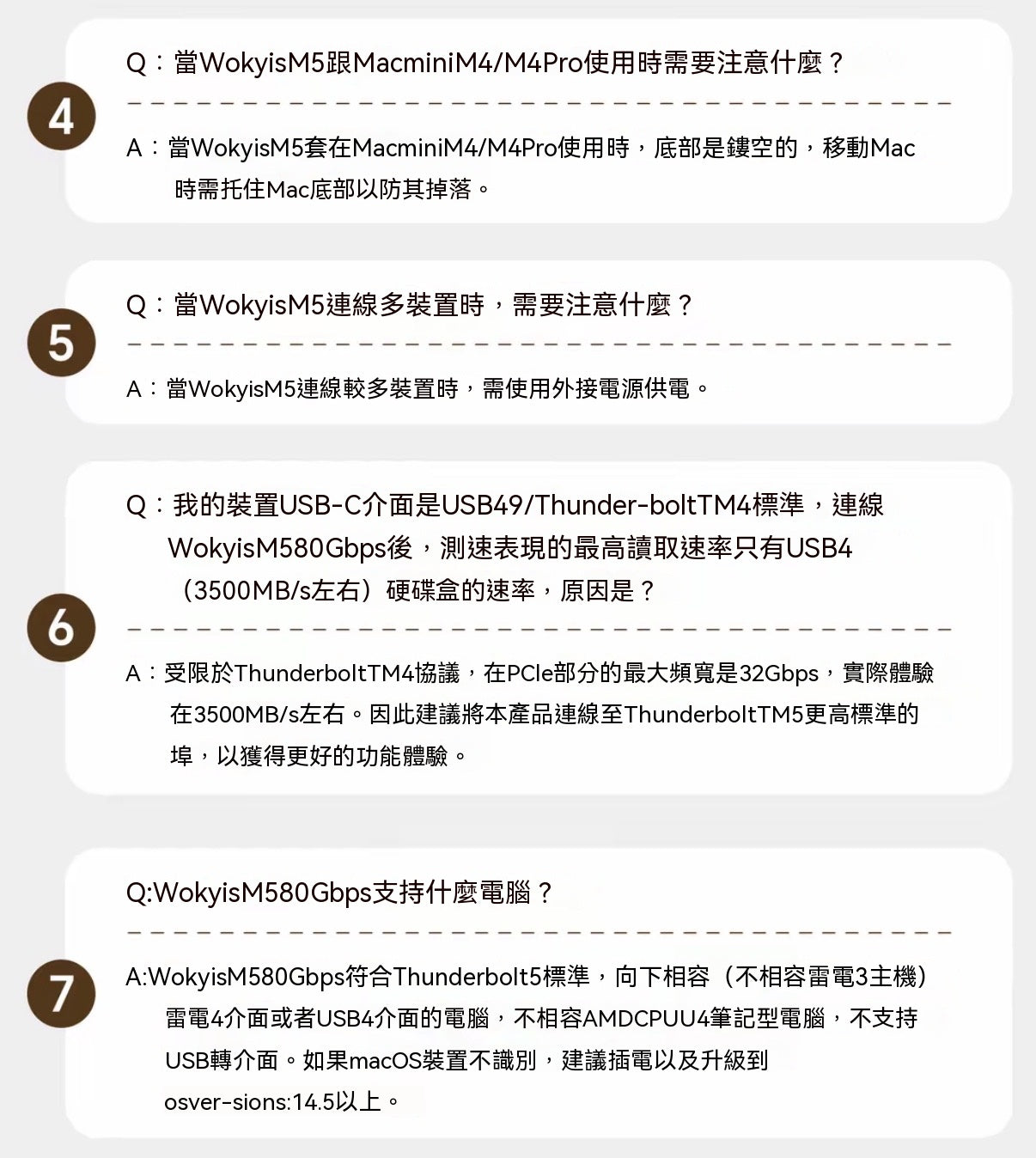
1. When moving the Mac mini, support the bottom to prevent the device from slipping and getting damaged.
2. When connecting multiple high-power devices, an external power supply must be used to avoid power shortages leading to device disconnections.
3. The HDMI port on the 10Gbps version is an input port and does not support video output; the DP port on the 80Gbps version is an output port, supporting up to 8K@60Hz output.
4. The SSD needs to be purchased separately and does not support NVMe SSDs with heatsinks or double-sided chips. Please back up your data before installation.
5. This product is not compatible with Thunderbolt 3 hosts and AMD CPU U4 laptops. For macOS devices, it is recommended to upgrade to version 14.5 or above.
6. Product images are renderings; the actual product may vary.
Video Link 🔗 (Copy to open)
https://www.instagram.com/reel/DZh1S_mSf8d/?igsh=ZGZvdjRvc3h1bndo