ollig好物分享
Rubik's Cube Microscope Portable Mini Dual-Light 3R-MJL02 Aluminum Alloy Magnifier
Rubik's Cube Microscope Portable Mini Dual-Light 3R-MJL02 Aluminum Alloy Magnifier
Couldn't load pickup availability
1. Product Information
• Product Model: 3R-MJL02 Miniature LED Cube Microscope
• Body Material: Lightweight aluminum alloy casing, entire unit weighs only 76g
• Screen Specification: 2.4-inch LCD display, resolution 320×240
• Image Sensor: 1/4-inch CMOS sensor, computer output 1280×720 high definition
• Observation Magnification: Three-stage switchable, 7x/12x/19x optical zoom
• Dual Light Source Configuration: 3 white LEDs + 3 UV lamps, circular uniform illumination
• Battery Specification: 3.7V 300mAh built-in rechargeable battery, approximately 60 minutes of battery life, about 40 minutes for full charge via Type-C
• Storage Method: TF (Micro SD) card slot, one-button image capture and storage
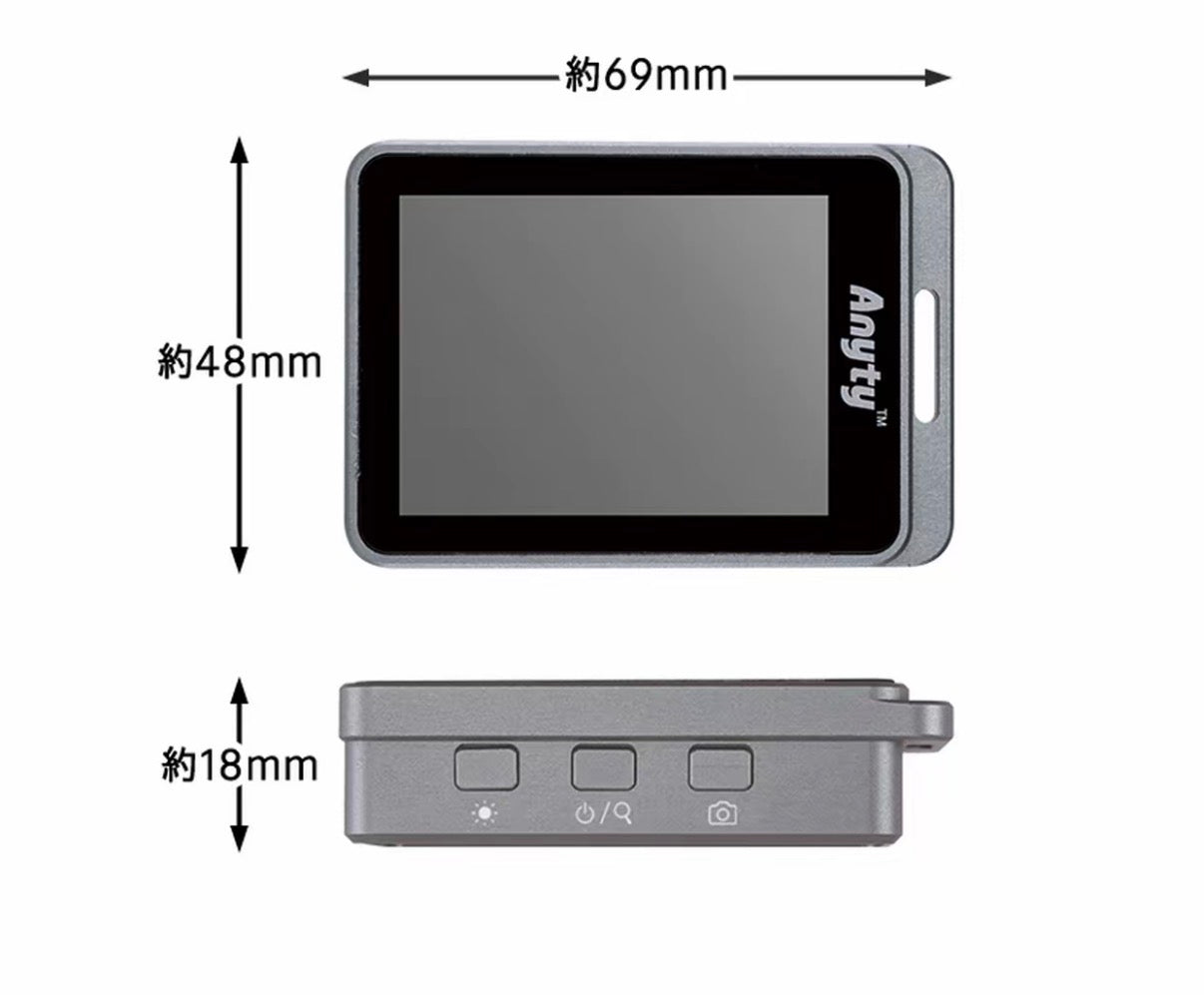
• Body Dimensions: 48×69×18mm, top hanging hole design for portable wear
• Standard Accessories: Storage bag, cleaning cloth, USB charging and data cable, TF memory card, instruction manual
• Applicable Scenarios: Circuit board inspection, textile fabric observation, metal screw defects, print anti-counterfeiting, material crack inspection, industrial maintenance, educational observation
2. Key Highlights
1. Dual light sources freely switchable for different inspection needs
White light restores true object colors, suitable for daily microscopic inspection of electronic components, metal, and fabric; UV light can detect fluorescent coatings, surface cracks, print anti-counterfeiting patterns, fine dirt and lint. Industrial inspection can be done with one device. Light source switching logic: Power-on white light → UV light → lights off, simple one-button operation.
2. Three-stage magnification, one-button switching, up to 19x magnification
Defaults to 7x wide-angle observation when powered on. Short press the power button to switch to 12x and 19x for detailed viewing. No need for complicated focusing. Quickly switch magnification based on sample size. Circuit details and textile patterns can be clearly displayed.
3. Lightweight aluminum alloy portable design, pocket-friendly
Weighing less than 80g, the body is about the size of an ID card. A hanging hole at the top allows for a lanyard for portability. No need to carry bulky desktop microscopes for factory inspections, maintenance, or field checks. Ready to use anytime, anywhere.
4. Built-in screen for real-time imaging, no external equipment needed
With a built-in 2.4-inch screen, you can directly view objects by placing them under the lens. No need for a smartphone. Intuitive for on-site inspections, communicating with technicians, and customer demonstrations.
5. Capture and save images + computer output, retain inspection data
One-button photo capture saves to the TF card. Connect to a computer via Type-C cable to directly read images, useful for inspection reports, sample comparisons, and retaining evidence for educational presentations.
6. Smart power saving, no worries about power loss during long-term use
Automatic shutdown after 5 minutes of inactivity prevents power drain if you forget to turn it off. Intuitive charging light: red for charging, green for full. Fast charging speed.
7. Simple three-button operation, zero learning curve for beginners
Only three buttons on the device: light source switch, power/zoom, and photo capture. No complex settings, so factory operators and students can quickly get started.
3. How to Use
Basic Observation Operations
1. Long-press the middle power button to turn on the device, default white light at 7x magnification;
2. Place the device lens-side down directly on the surface of the object to be inspected;
3. Single press the left light button to switch light sources: white light → UV light → lights off;
4. Short press the middle power button to cycle through magnification: 7x → 12x → 19x;
5. Single press the right camera button to capture the current image and save it to the memory card.
Charging and Data Export
1. Connect the device and charger/computer with a Type-C cable. A red light indicates charging, and it turns green when fully charged;
2. When connected to a computer, captured images on the TF card can be directly accessed and copied for reports and sample comparisons.
Portability and Storage
Turn off the device after use and store it in the included storage bag. It can be worn with a lanyard threaded through the top hanging hole.
4. Real User Reviews
1. Factory Repair Technician: "Super convenient to carry this for repairing circuit boards for clients. I used to lug around a big microscope, but this one fits in my pocket. The UV light is super practical for checking circuit cracks."
2. Fabric Buyer: "White light gives a clear view of fabric patterns and yarn density. The UV light can also detect fluorescent treatments in fabrics. No need to carry a magnifying glass and phone for sourcing inspections anymore."
3. Electronics Repair Student: "Super easy to operate, the three buttons are intuitive. I can capture detailed circuit images and save them, then just plug into the computer for my internship report. Saves so much time."
4. Printing Factory Inspector: "Perfect for checking anti-counterfeiting patterns on packaging. The three-stage magnification switch is smooth, and the screen image isn't blurry. The aluminum alloy body feels solid and drop-resistant."
5. Craft Enthusiast: "Very small and no burden to carry. I can clearly see scratches on metal jewelry surfaces and uneven coatings. The battery life lasts all day for field work."
5. Precautions
1. The lens is a precision optical component; avoid scratching the mirror with sharp objects. Gently wipe off dirt with the included cleaning cloth. Do not directly rinse the device with water.
2. UV light emits ultraviolet rays. Prolonged direct viewing of the light source can irritate eyes. When observing, avoid direct eye contact with the light ring.
3. The device has a built-in lithium battery. Do not place it in high-temperature environments or expose it to prolonged sunlight. If not used for a long time, it is recommended to recharge it once every month.
4. For observation, it is only suitable to be placed flat on the surface of a flat object to be inspected. Do not press hard on the device to avoid damaging the lens.
5. The TF card slot only supports Micro SD cards. Please turn off the device when installing/removing the card to prevent image storage failure.
6. Only use 5V standard USB charging equipment for charging. High-voltage fast chargers can easily damage the internal battery.
7. The device has a low waterproof rating. Keep it away from water and oil stains. After factory use, be sure to wipe it clean before storing.
8. Automatic shutdown after 5 minutes of inactivity is a normal power-saving feature, not a malfunction. Long-press the power button again to wake it up.
Video Link 🔗 (Copy to open) https://www.instagram.com/reel/Dap0vtdSBec/?igsh=eXlwbjN5eW93Nmhk
分享