ollig好物分享
Desktop Magnetic Wireless Phone Charger
Desktop Magnetic Wireless Phone Charger
Couldn't load pickup availability
I. Basic Product Information
• Product Material: Plastic, PC, Silicone
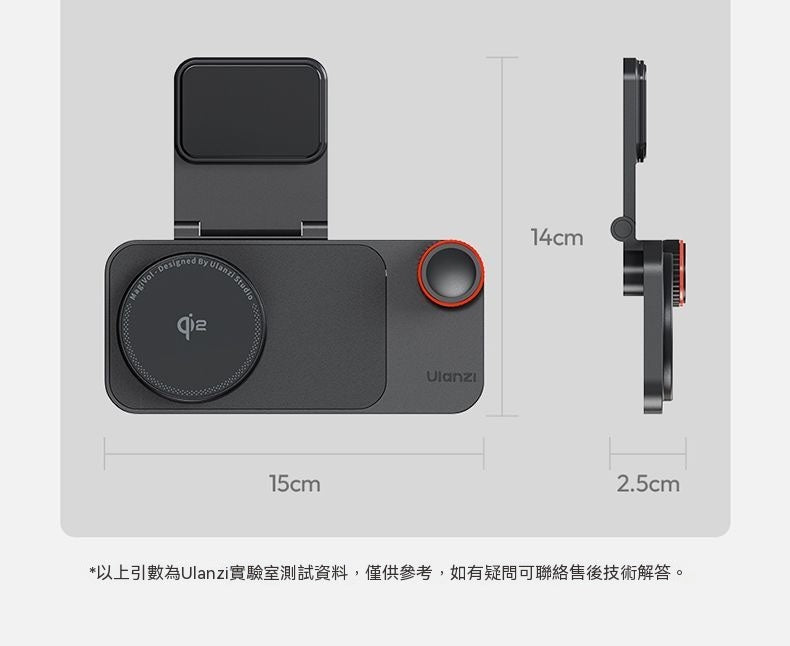
• Product Dimensions: 15cm × 14cm × 2.5cm
• Net Weight/Gross Weight: Approx. 130g / Approx. 285g
• Wireless Standard: Qi2 protocol, compatible with MagSafe
• Charging Power: Up to 15W (Max), downward compatible with 5W/7.5W/10W
• Bluetooth Version: Bluetooth 5.3, effective connection distance 10m
• Compatible Systems: iOS, Android, supports all iPhone 12 and above models, partially supports Android phones with Qi2 protocol
• Mounting Method: Removable nano adhesive tape
• Core Functions: Magnetic wireless charging, Bluetooth multimedia control, phone stand, desktop Standby secondary screen
• Packing List: Wireless charger host ×1, charging cable ×1, spare nano adhesive tape ×1, manual ×1
II. Core Highlights
1. Qi2 15W Magnetic Fast Charging, Safe and Secure
Adopts the Qi2 wireless charging protocol, with a 12N strong magnetic charging pad. Simply place your phone to instantly attach and start charging, with a maximum fast charging power of 15W, allowing you to quickly top up your battery during short breaks. Built-in five-fold circuit protection (over-voltage, under-voltage, over-current, short-circuit, over-temperature) safeguards your phone's battery health throughout the charging process, ensuring a more secure charge.
2. Bluetooth Multimedia Knob, Convenient Finger-Tip Operation
Equipped with a responsive physical knob on the right side of the device. Long-press for 5 seconds to enter Bluetooth pairing mode. After connecting to your phone, a single click of the knob can control music play/pause, rotating the knob adjusts volume up/down, and pressing + rotating allows you to switch tracks. Stable control is maintained within 10 meters, eliminating the need to frequently switch back to your phone while working, making operations smoother.
3. Under-Screen Installation + 210° Adjustment, Instantly Becomes a Desktop Secondary Screen
Comes with removable nano adhesive tape, allowing direct attachment to the monitor bezel without drilling or modification, saving desktop space. The stand supports 210° damped flip adjustment. When the phone is horizontally attached, iPhones can automatically activate Standby mode to display weather, date, and to-do items in real-time; vertical attachment allows you to check messages and calls at any time, without frequently picking up your phone, maximizing office efficiency.
4. Hidden Cable Management Design, Say Goodbye to Desktop Clutter
The back of the device features a dedicated cable management slot, allowing the charging cable to be perfectly stowed, keeping your desktop free of excess cables and tidy at all times, perfectly suited for users with "OCD." Paired with a universal USB-C charging port, it's compatible with most charging cables on the market, making everyday use more convenient.
5. Flexible Installation, Adaptable to Multiple Scenarios
The nano adhesive tape provides strong and traceless adhesion. For best results, allow 24 hours of static placement after attachment. Large-screen phones like Pro/Pro Max can also be securely supported. In addition to under-screen installation, it can also be used directly on the desktop, easily adapting to office, home, and other scenarios.
III. How to Use
1. Installation and Fixing
1. Wipe the adhesive area on the monitor bezel clean, ensuring it is dry and flat.
2. Peel off the backing film from the nano adhesive tape and attach the product to the desired position, pressing firmly.
3. Allow 24 hours of static placement before attaching your phone to ensure secure fixation.
2. Bluetooth Pairing
1. Long-press the device knob for 5 seconds until the Bluetooth indicator light flashes, entering pairing mode.
2. Turn on Bluetooth on your phone, search for and click "Ulanzi MagiVol" to complete the connection. A solid indicator light means a successful connection. Subsequent uses will auto-reconnect without needing to re-pair.
3. Charging & Usage
1. Bring your Qi2/MagSafe-compatible phone close to the charging area, and it will automatically attach and begin wireless charging.
2. Rotate the stand to adjust to a suitable angle. Horizontal use can activate Standby mode, while vertical use allows you to view message notifications.
3. Use the knob to control music play/pause, volume adjustment, track switching, and other operations.
IV. Precautions
1. The wireless charging function only supports Apple phones with iOS 14 and above, and Android devices that support the Qi2 protocol. Please confirm device compatibility before use.
2. During installation, ensure the adhesive surface is clean and flat. Dust or water stains will affect the fixing effect of the nano adhesive tape. It is recommended to let it sit for 24 hours after adhesion before use.
3. The thickness of the phone case and device model may affect charging power and duration. Actual charging effects are subject to use.
4. The product has no built-in battery and requires continuous connection to a Type-C power adapter. It is recommended to use a charging head that supports 15W or higher output.
5. Avoid placing the product in high-temperature or humid environments, and do not disassemble the product yourself to prevent malfunctions.
6. When connecting via Bluetooth, keep the device within the effective range of 10 meters. Connection instability may occur if outside this range.
Video link 🔗 (copy to open) https://www.instagram.com/reel/DbKeu_5Sphh/?igsh=MXZqZnJkMDd6M2trbg==
分享