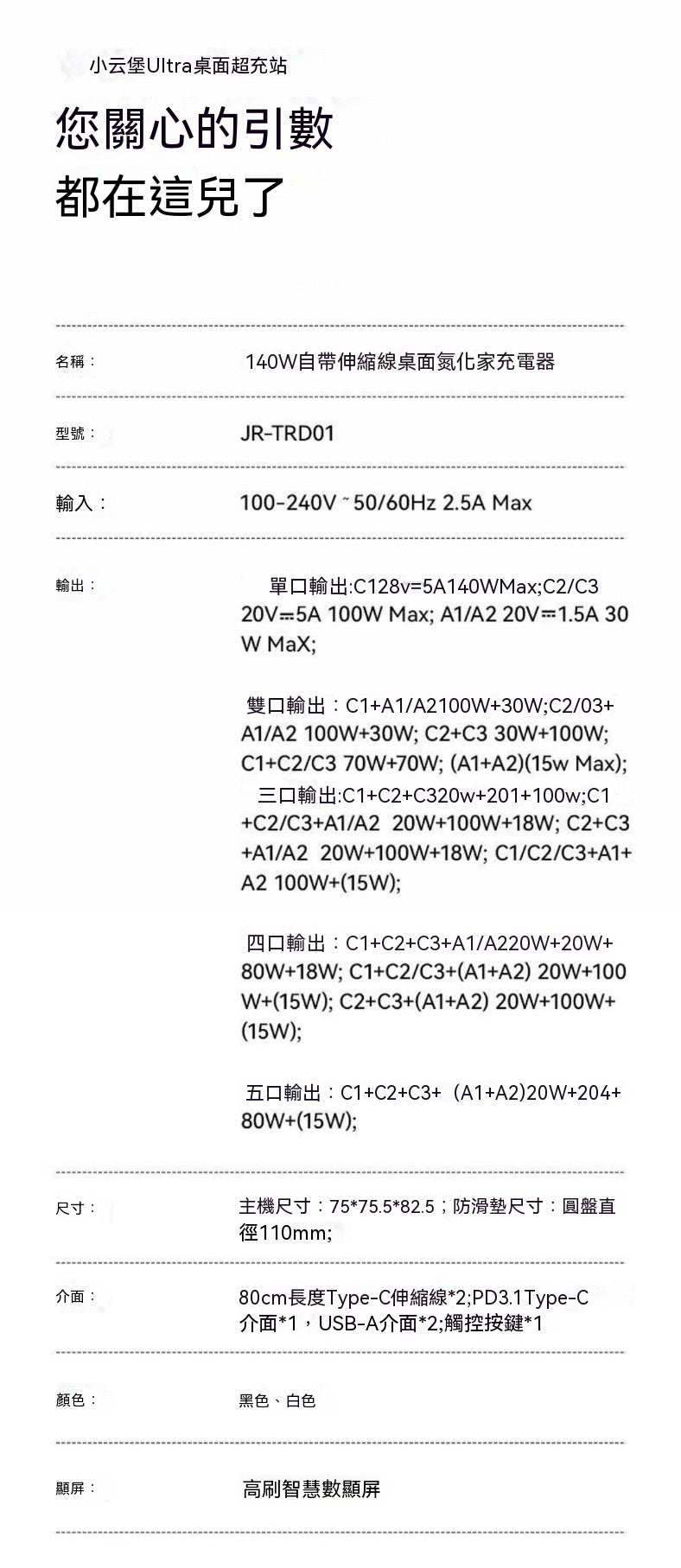
Product Information
• Product Name: 140W GaN Desktop Charger with Retractable Cables
• Model: JR-TRD01
• Input: 100-240V ~ 50/60Hz 2.5A Max
• Output Interfaces: 2 x 80cm Type-C Retractable Cables + 1 x PD3.1 Type-C Port + 2 x USB-A Ports
• Dimensions: Main unit 7575.582.5mm, Anti-slip mat disk diameter 110mm
• Colors: Black, White
• Special Features: High-refresh smart digital display, supports visualization of temperature and power
Key Highlights
1. 140W Ultra-Fast Charging: Up to 140W PD3.1 protocol for a single port, can charge a phone to 60% in 20 minutes, nearly doubling the efficiency of older models on the market, while also compatible with laptops, tablets, and other devices.
2. Dual Retractable Cable Design: Built-in 2 x 80cm retractable Type-C cables, pull to charge, pull to store, say goodbye to cluttered and tangled desktop cables.
3. Magnetic Stable Base: Upgraded anti-slip magnetic base ensures that pulling cables with one hand won't cause the charger to slide, solving the problem of older chargers being easily moved.
4. Smart Visual Temperature Control: Equipped with AI temperature control algorithm and NTC chip, effectively reduces temperature by over 92% during fast charging. The screen can display temperature changes and power distribution, making charging safer.
5. Multi-Port Efficient Output: Supports charging up to 5 devices simultaneously, with flexible power distribution. Single-port/dual-port/five-port output modes are clearly visible, suitable for both office and home use.
6. Personalized Interactive Experience: The high-refresh digital display screen features an built-in electronic pet with different expressions for standby and charging states, combining practicality with fun.
7. Three-Sided Flip Design: 360° all-around flip allows for unrestricted viewing angles in various scenarios such as meeting rooms and desks, providing more flexible access to interfaces.
How to Use
1. Basic Charging: Insert the charger's power cable into an outlet and press the touch button to activate.
2. Using Retractable Cables: Pull out one of the 80cm Type-C retractable cables with one hand, connect it to your phone/laptop. After charging, lightly pull the cable head to automatically retract it.
3. Multi-Device Charging: Simultaneously connect 2 retractable cables, 1 Type-C port, and 2 USB-A ports. The screen will instantly display the power distribution for each port.
4. Mode Switching: Use the touch button to switch between power display, temperature control, and animated pet interaction modes.
5. Angle Adjustment: Flip the three sides of the charger to select the most comfortable angle for accessing the interfaces.
Real User Reviews
• "My desk is finally tidy! The two retractable cables are perfect for my phone and laptop, and the 140W charges my laptop super fast. The screen also shows the power, which is incredibly convenient."
• "The magnetic base is so practical. Before, pulling cables would always drag the charger along, but now I can pull cables with one hand, and it stays perfectly stable."
• "The pet screen is adorable; it changes expressions while charging and even changes color to warn of high temperatures. My kids love playing with this little guy."
• "This is all I need when traveling for business. It charges my laptop, phone, earbuds, and watch all at once, no need to carry a bunch of charging bricks, and it's lightweight too."
Precautions
1. Do not use in humid, high-temperature, or flammable environments, and avoid spilling liquids onto the charger.
2. Do not violently pull the retractable cables. When retracting, a gentle pull will automatically coil them back to avoid damaging the internal spring mechanism.
3. When charging multiple devices simultaneously, the total power should not exceed 140W. Some ports will automatically reduce power distribution, which is normal.
4. Please use the original power cable provided. Do not use unqualified cables to avoid the risk of overheating or short circuits.
5. If the screen displays a high-temperature warning, please temporarily stop charging or reduce the number of devices being charged, and resume use after the temperature drops.
6. This product supports PD3.1 and other protocols, but some older devices may not achieve the maximum power. Please refer to actual device compatibility.