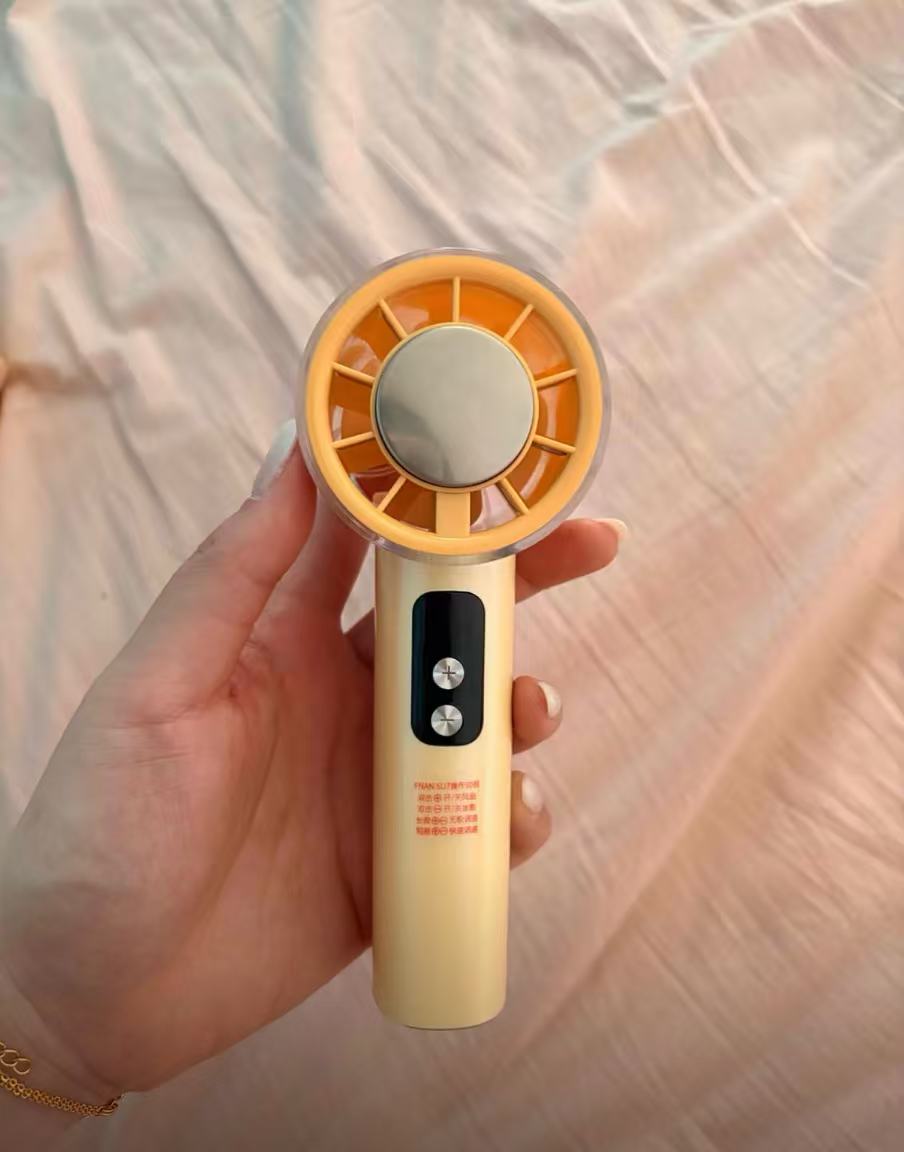
1. Product Information
• Product Name: 100-Speed High-Velocity Handheld Cooling Fan with Ice Compress Function
• Model: SU7
• Core Specifications:
◦ Battery Capacity: 3000mAh
◦ Fan Speed Adjustment: 100-speed high-velocity turbo fan
◦ Battery Life: Up to 8-16 hours on low speed, approximately 4-6 hours on full speed
◦ Special Features: Semiconductor ice compress cooling, LED digital display, can be used as a desktop fan with a base
◦ Weight: Approximately 200g, can be carried on airplanes/high-speed rail
◦ Charging Method: USB Type-C fast charging
• Color Options: Silver, Peach Pink, Warm Orange, Cream Yellow, Light Green, Off-White (6 colors in total)
• Applicable Scenarios: Outdoor commuting, office desk, outdoor activities, daily cooling
2. Key Highlights
💨 100-Speed High-Velocity Turbo Strong Wind: Equipped with an aero-model-grade brushless motor, providing powerful and concentrated airflow, significantly improving cooling efficiency for quick relief even outdoors.
❄️ Ice-Cool Compress for Rapid Cooling: Features a semiconductor cooling chip at the front. Activating the ice compress mode releases ice-cool air, alleviating outdoor heat and discomfort.
🔋 Ultra-Long Battery Life and Digital Display: Large 3000mAh battery, with an LED screen displaying real-time power level and fan speed, making the operating status clear at a glance.
🎨 Dopamine Color Palette, Dual-Use Design: Available in various macaron colors, comes with a dedicated base for dual handheld/desktop use, beautiful and practical.
✈️ Lightweight and Portable, Flight-Friendly: Weighing only about 200g, its lightweight body is easy to hold without strain or bulk. Convenient for carrying on planes, high-speed rail, and for everyday outings.
3. How to Use
1. Power On and Fan Speed Adjustment: Long-press the side button to turn on. Single-click the button to switch fan speeds (1-100 speeds). The LED screen will simultaneously display the current speed and battery level.
2. Using Ice Compress Mode: Long-press for two seconds to switch to ice compress mode; the front cooling plate will begin to cool, emitting ice-cool air. Long-press again to turn off the ice compress function.
3. Desktop Use: Align the fan with the base and snap it in for stable placement on a desk, freeing up your hands.
4. Charging Method: Connect to a power source using a Type-C charging cable. The screen will display the charging status. It takes approximately 3-4 hours to fully charge the battery.
4. Real User Reviews
• "The silver model looks amazing! The fan is much stronger than I expected. After walking outdoors for 10 minutes, the medium setting quickly cools me down, and the ice compress mode is super comfortable!"
• "An office essential! The AC isn't cool enough in summer, so I put this on my desk on a low setting. It's cool and quiet, and my colleagues are all asking about it!"
• "The battery life is incredible. I took it camping outdoors for the weekend, used it all day on a low setting, and it still didn't need charging. It's also very stylish and looks great in photos!"
• "Super portable! It doesn't take up any space in my bag and is very convenient for high-speed rail travel. The high speeds can be a bit noisy, so I recommend using low to medium speeds for daily use."
5. Precautions
⚠️ Do not expose the fan to direct sunlight or high temperatures for extended periods to prevent battery aging.
⚠️ After prolonged use of the ice compress mode, water droplets may condense on the cooling plate surface. Do not touch or wipe them with your hands to avoid short circuits.
⚠️ When charging, please use a 5V/1A charger. Avoid using high-power charging heads, which can damage the battery.
⚠️ Children should use the fan under adult supervision. Do not insert fingers or foreign objects into the fan's air inlet to prevent injury.
⚠️ If the device gets wet or damp, immediately turn it off and wipe it dry. Wait until it is completely dry before using it again to avoid affecting its lifespan.